Memmon: Making the Invisible Visible
Building a RAM monitor for AI development workflows
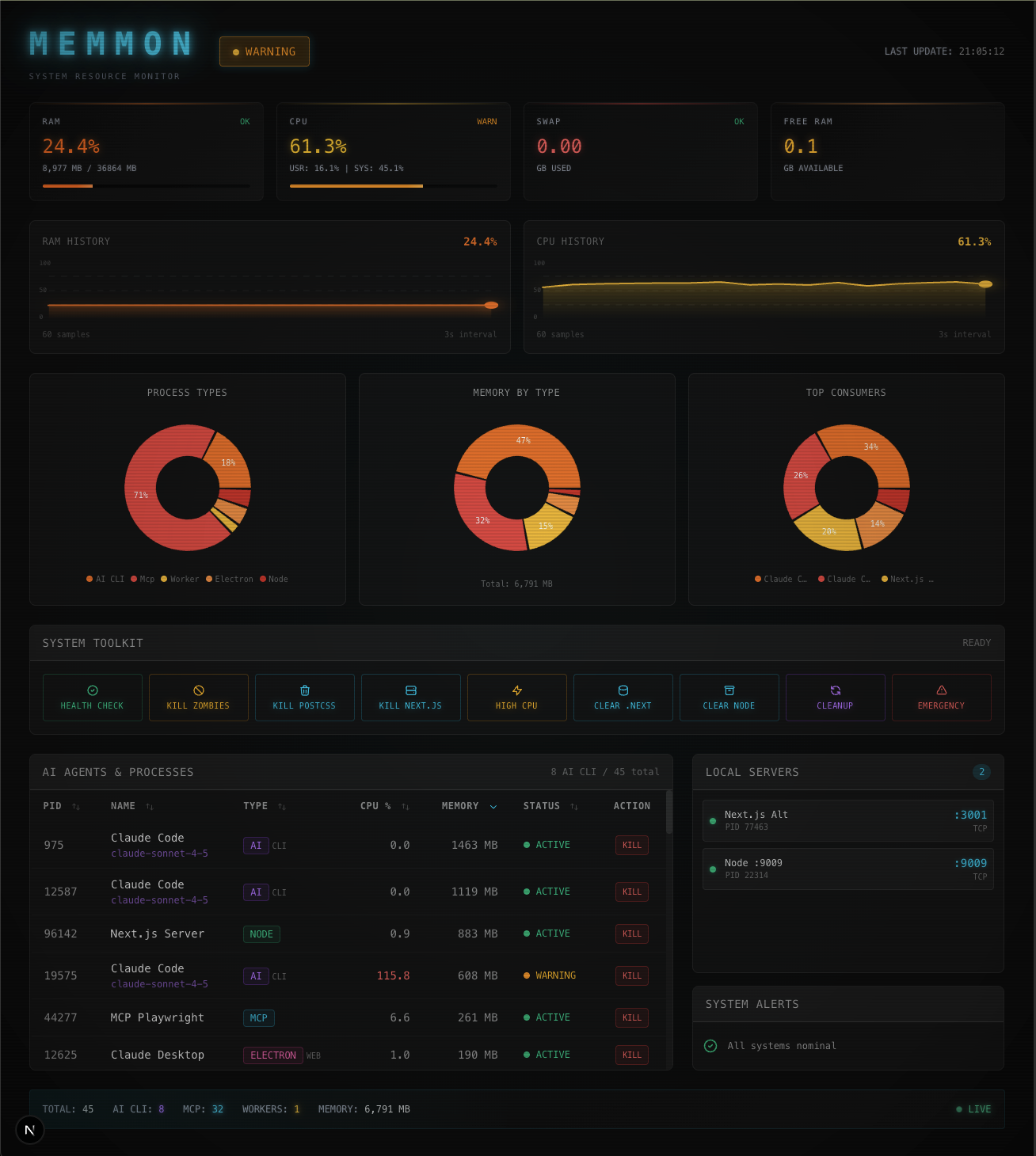
Memmon: Making the Invisible Visible
My computer kept crashing.
No warning. No graceful degradation. Just a spinning beachball and the sinking realization that I'd lost work because some process decided to eat all my RAM.
The culprit? AI agents doing exactly what I asked them to do. Working hard. Too hard. Consuming resources until there were none left.
Activity Monitor wasn't cutting it. By the time I'd opened it, sorted by memory, and found the problem, it was too late. I needed to see what was about to happen, not what already had.
So I built Memmon.
What It Is
Memmon is a Next.js dashboard that runs on port 1111 (easy to remember when your system is dying). Four panels. One purpose.
Memory Usage: Green, yellow, red. That's it. No percentages to interpret. Green means work. Yellow means pay attention. Red means kill something now.
Process List: Top memory consumers, ranked. One-click kill. When you're at 97% and spinning, you don't have time for Activity Monitor's dialog boxes.
Electron Tracking: Claude, VS Code, Comet - these Electron apps can consume gigabytes while looking innocent. Memmon watches them specifically.
Server Monitor: Shows what's actually running on your dev ports. That Next.js instance you "stopped" at 3pm? Still there. Memmon sees the ghosts.
Why It Works
You can't fix what you can't see.
Traditional monitors show you the present. Memmon shows you the trajectory. It's the difference between a rearview mirror and a windshield.
The color-coding removes decision paralysis. You don't calculate headroom or interpret graphs. You look at a color and know if action is required. The interface constrains your options to make decisions faster.
And because it lives in a pinned browser tab, you see it constantly. Passive visibility beats active monitoring every time. The information is just... there.
The Real Benefit
Here's what I didn't expect: Memmon changed my behavior.
When you see resource consumption in real-time, you make different choices. Close Chrome tabs you don't need. Actually quit Slack instead of minimizing it. Stop running three AI assistants simultaneously "just in case."
It's like those home energy monitors. The wattage savings are nice, but the real value is awareness. Awareness changes consumption.
Three Things I Learned
1. Build for the actual problem. I didn't build a comprehensive monitoring suite with network traffic and CPU temps and disk I/O. I built RAM tracking and process killing for a dev environment where agents go rogue. That's it.
2. The best tool is the one you use. Memmon isn't sophisticated. It's a dashboard with colored bars and a kill button. But I use it every day. That's the entire point.
3. Simplicity is a feature. Port 1111. Green/yellow/red. One-click kills. No configuration, no settings, no complexity. It does one thing well.
What's Next
The current version works. But there are obvious extensions:
- -Historical tracking for patterns
- -Alert thresholds with notifications
- -Claude Code integration to show which agent is which process
- -One-click port management
But those are features. Right now, Memmon is a tool. Tools solve specific problems you have today. Products solve generic problems others might have tomorrow.
I needed a tool. So I built one.
The Bigger Picture
As AI systems get more capable and autonomous, we need better visibility into what they're doing. Not for control - for collaboration.
When an agent crashes your system, it's not malicious. It's enthusiastic. It's trying to help without understanding the constraints it's operating under.
Our job isn't to limit the enthusiasm. It's to make the constraints visible. To create systems where AI can work hard without killing the machine.
Memmon is my small contribution to that. A simple dashboard that says: "Here's what's happening. Here's what's about to happen. Here's a button if you need to stop it."
It's not revolutionary. It's not AI or blockchain or whatever the hype cycle demands.
It's colored bars and a kill button.
But sometimes that's exactly what you need.
Stack: Next.js 14, TypeScript, Tailwind Port: 1111 Platform: macOS Built with: Claude Code