Essay
Touching Electrons: How a Crash Led to a Better Workflow
Sometimes the answer isn't to build something new
I wanted to see my code. Really see it. Not in the abstract way you understand a codebase after months of working in it. I wanted to touch the electrons.
The Problem
I wanted to see my code. Really see it.
Not in the abstract way you understand a codebase after months of working in it. I wanted to touch the electrons. To have a constant visual of what files exist, what's changed, what branch I'm on. The kind of spatial awareness that makes you feel grounded in a project.
So I installed Antigravity.
It's a slick tool—gives you a visual file tree, shows your git status, makes the codebase feel tangible. Perfect, right?
Except it kept crashing my machine.
The Realization
After the third hard restart, I had that moment every builder eventually has: What am I actually using here?
I thought about it. Really thought about it.
- File tree: I want to see what exists
- Git status: I want to know what branch I'm on and what's changed
That's it. Two features. Two.
I was running a heavy Electron app that was melting my laptop... for two features.
The Discovery
When I told Claude what I wanted, I was ready to build something. Maybe a custom iTerm2 plugin? A lightweight Antigravity alternative? Something new.
Instead, Claude asked a question that stopped me:
"Why not try tmux?"
Tmux. I'd never heard of it.
"Terminal multiplexer," Claude explained. A tool that's been around for decades. Lets you split your terminal into panes, run persistent sessions, customize everything.
My first reaction: Why don't I know about this?
My second reaction: Let's dive in.
The Build
Learning tmux felt like learning a new language—except the vocabulary is small and the payoff is immediate.
The basics took maybe ten minutes:
Ctrl+ais your "prefix" key (like saying "hey tmux, listen up")|splits the screen vertically-splits horizontally- Arrow keys move between panes
That's it. That's enough to start.
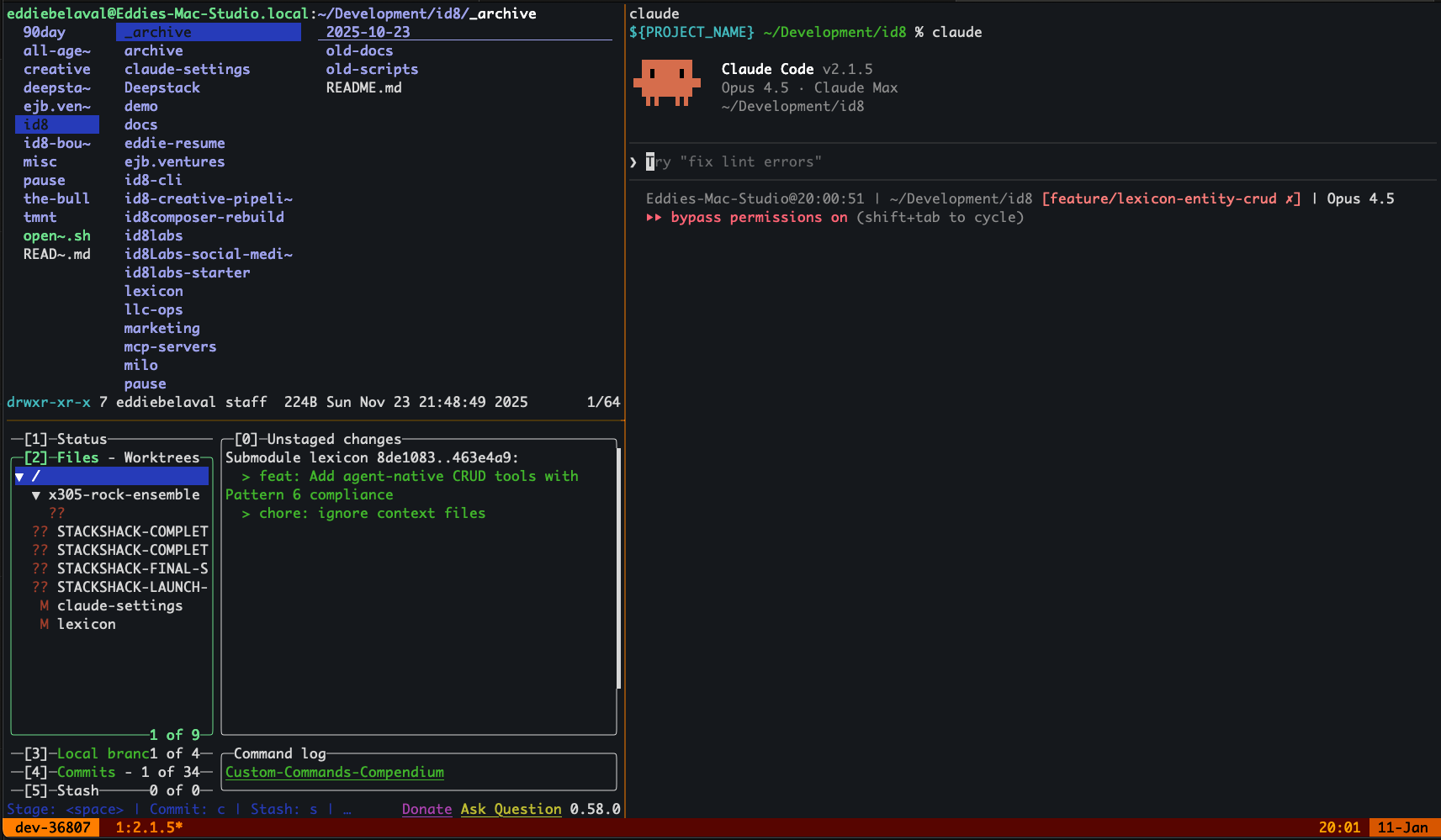
But we didn't stop there. Within an hour, we'd built something beautiful:
A custom tmux configuration with:
- "Amber Ember" theme (because aesthetics matter)
- A dev layout triggered by
prefix + Dthat creates:- Top-left: live file tree
- Bottom-left: live git status
- Right: my main workspace
- Session persistence (it survives restarts!)
- Vim-style navigation (because old habits die hard)
A launch script that fires up:
lf(a terminal file manager) for browsinglazygitfor git operationsclaudefor... well, you know
One command: dev-session.sh
And I have exactly what I wanted. File visibility. Branch awareness. No crashes.
The Lesson
There are tools that have been solving problems for decades. Battle-tested. Reliable. Free. And I didn't know they existed.
I was ready to build something. To write code. To create a new thing that solved my problem. That's my instinct as a builder—when something doesn't work, make something better.
But the better move was to discover. To ask: "Has anyone solved this before?"
The answer is almost always yes.
I traded a fancy Electron app for a 30-year-old terminal multiplexer. No crashes. Faster startup. More control. And I learned something new.
Sometimes the answer isn't to build something new. Sometimes it's to discover what already exists—and make it yours.
Get the Setup
If you want this workflow, just paste this prompt into your own Claude Code:
Install the ID8Labs tmux dev workflow for me. This setup gives me:
- lf file manager in top-left pane
- lazygit for git operations in bottom-left
- Main editor/claude pane on the right
- "Amber Ember" theme
- Session persistence

Steps:
1. Install dependencies: brew install tmux lf lazygit tree
2. Download tmux.conf from https://raw.githubusercontent.com/eddiebelaval/id8labs/main/content/stackshack/tmux/tmux.conf and save to ~/.tmux.conf
3. Download dev-session.sh from https://raw.githubusercontent.com/eddiebelaval/id8labs/main/content/stackshack/tmux/dev-session.sh and save to ~/bin/dev-session.sh (create ~/bin if needed)
4. Make it executable: chmod +x ~/bin/dev-session.sh
5. Install tmux plugin manager: git clone https://github.com/tmux-plugins/tpm ~/.tmux/plugins/tpm
6. Tell me when done so I can test it
Or do it manually:
# Install dependencies
brew install tmux lf lazygit tree

# Get the config
curl -o ~/.tmux.conf https://raw.githubusercontent.com/eddiebelaval/id8labs/main/content/stackshack/tmux/tmux.conf

# Get the launch script
mkdir -p ~/bin
curl -o ~/bin/dev-session.sh https://raw.githubusercontent.com/eddiebelaval/id8labs/main/content/stackshack/tmux/dev-session.sh
chmod +x ~/bin/dev-session.sh

# Install plugin manager (for session persistence)
git clone https://github.com/tmux-plugins/tpm ~/.tmux/plugins/tpm

# Launch it
~/bin/dev-session.sh
The magic shortcut: Ctrl+a then D = instant dev layout
Why it works:
- Zero startup time
- Never crashes
- Survives terminal closes
- Looks good
Final Thought
Antigravity was trying to do too much. My tmux setup does exactly two things well. And that's the difference between a tool that fights you and a tool that fades into the background.
The goal was never to have a cool tool. The goal was to feel connected to the code.
Mission accomplished.
Built live with Claude during a Sunday afternoon session. Sometimes the best features are the ones you don't build.